 Latest release v1.0.2
WristStream
Plex music on your Apple Watch
- On the App Store
- watchOS
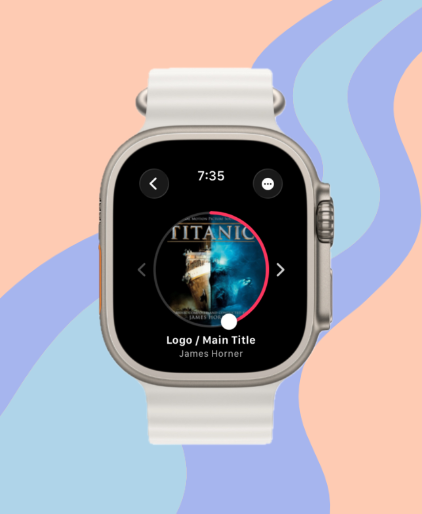
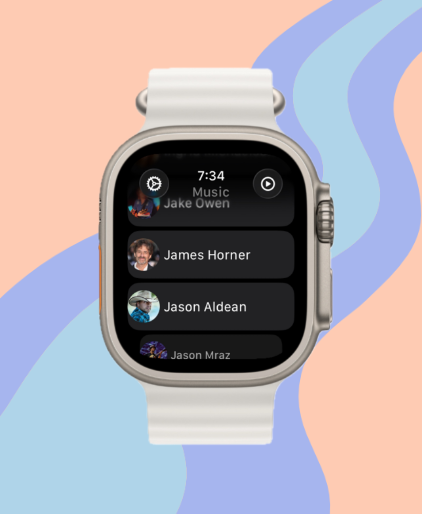
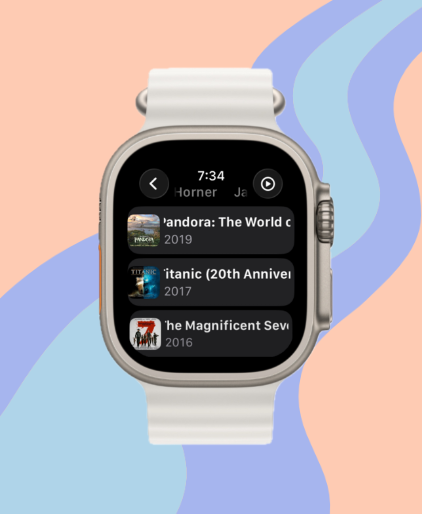
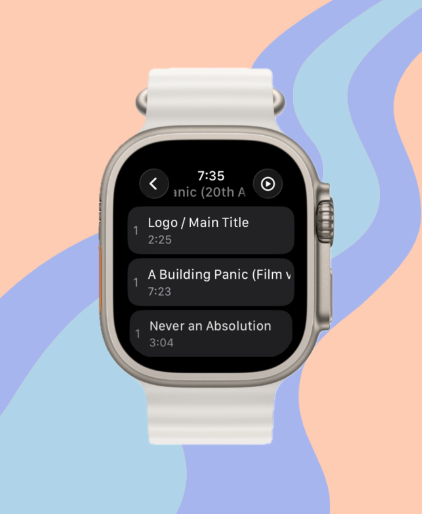
WristStream plays the music on your Plex Media Server from your Apple Watch. I love Plex and Plexamp, and I wanted my library on my wrist with nothing to install on the phone.
It's a watch-only app. You sign in with a PIN at plex.tv/link, pick a server and a music library, and browse or search from there. Anything you download plays without a connection, so you can leave the phone at home.
I started it in April 2024 and set it aside after two weeks. In August 2025 I came back, dropped the third-party Plex library and wrote against the Plex API directly. The first TestFlight build went up in September 2025, and 1.0 went live on the App Store on July 18, 2026.
Features
Streams from your server
Music plays from your own Plex Media Server. You pick the quality, from 64 kbps up to the original file, and the app sticks to it. The default is 128 kbps.
Offline downloads
Download a track, an album, or a playlist to the watch. Downloads keep going with your wrist down and use the same quality setting as streaming. Turn on Downloaded Only in Settings to see just what's on the watch.
PIN sign-in
The watch shows a code. Enter it at plex.tv/link on any device and you're in. Your sign-in token is stored in the Keychain.
Browse and search
Artists, albums, songs, and playlists, with an A to Z index for big libraries. Search covers artists, albums, and songs. Recently Played and Recently Added came in 1.0.2.
Complications
Circular, rectangular, inline, and corner complications show what's playing. The rectangular one has previous, play/pause, and next buttons that work without opening the app.
Now Playing
Pick the Modern or Circular layout. The Digital Crown sets volume, and there are shuffle, repeat, and Add to Playlist controls. Tracks also show up in the watch's own Now Playing app.
Playback progress
While you listen, the app sends playback progress to your Plex server. You can switch that off in Settings.
Movies and TV (experimental)
Turn on Video Libraries in Settings to add your movie and TV libraries, with Continue Watching and Recently Added. Video plays at 240p to 720p.
Release history
3 releases since April 2024.
- Major release
- Patch
- Milestone
September 2026
Recently Played and server failover
v1.0.2Latest- Recently Played and Recently Added album views in the music browser.
- On launch and on resume the app tries each of your server's addresses and switches to one that answers. Moving between home Wi-Fi and a remote connection used to leave it stuck.
- Complications update on every track change again. The saved artwork was too big for the circular complication, and WidgetKit refused the whole reload.
- Cached lists refresh once per session instead of every 30 minutes.
Steadier playback
v1.0.1- 128 kbps is the new default, and the app uses the quality you pick without lowering it.
- Removed next-track prefetch. Plex Media Server allows one transcode per device, so the prefetch was cutting off the song you were listening to.
- A to Z paging for large libraries, plus Continue Watching and Recently Added for movies and shows.
- Settings split into Display, Data Control, Server & Library, and Storage pages. The tip jar is gone.
July 2026
App Store release
v1.0.0- Fixed sign-in for shared Plex accounts. Their library list came back empty, and App Review rejected the build over it.
- Downloads run in the background, so they keep going with your wrist down.
- Movies and TV moved behind an opt-in switch in Settings.
March 2026
Experimental movies and TV
Video- First pass at playing movie and TV libraries on the watch.
Watch face complications
Complications- Complications that show the current track in circular, rectangular, inline, and corner sizes.
- Rectangular complication with previous, play/pause, and next buttons.
December 2025
Playlists and the album browser
Playlists- Browse and play your Plex playlists.
- Browse every album in a library.
- Digital Crown volume control.
Older releases (4)
October 2025
Offline downloads
Downloads- First version of downloads, for playing music without a connection.
September 2025
First TestFlight build
TestFlight- Version 1.0.0, build 1, went to TestFlight.
- The app icon went in the same day.
Working prototype
Prototype- I restarted the project on August 28, 2025 by removing the PlexSwift library and calling the Plex API directly.
- Search and Now Playing screens first show up here.
April 2024
Started the project
Started- New watchOS project, then called plex_music.
- Artist list and artist detail views followed by May 1, 2024.
Roadmap
- Done
Offline downloads
Tracks, albums, and playlists download to the watch and play without a connection.
- Done
Search and playlists
Search across artists, albums and songs, plus playlist browsing and playback.
- Done
Complications
Watch face complications with play/pause and skip buttons.
- Done
Recently played
Recently Played and Recently Added album views, added in 1.0.2.
- Now
Movies and TV
Video libraries work behind an experimental switch in Settings.
- Later
Siri shortcuts
Start playback with Siri.
- Later
Plex favorites sync
Keep favorites in step with your Plex server.
FAQ
Do I need an iPhone app?
No. WristStream is a watch-only app, so everything installs and runs on the watch.
How do I sign in?
Open the app and it shows a PIN. Go to plex.tv/link on any device, enter the PIN, then pick your server and music library.
What quality does it stream at?
128 kbps by default. Settings has Original, 320, 256, 192, 128, 96, and 64 kbps. Anything below Original is transcoded by your Plex server, and downloads use the same setting.
Can I listen without a connection?
Yes. Download tracks, albums, or playlists to the watch and they play offline. Turn on Downloaded Only in Settings to see just what's on the watch.
What does it cost?
$4.99 on the US App Store as of September 2026. There are no in-app purchases or subscriptions. The TestFlight beta is free.
Which watchOS version do I need?
watchOS 26 or later.
Does it play movies and TV?
Yes, as an experiment. Turn on Video Libraries in Settings and your movie and TV libraries show up with Continue Watching and Recently Added. Video plays at 240p to 720p.
Is this made by Plex?
No. I build it on my own, and it isn't affiliated with Plex Inc.
WristStream
Plex music on your Apple Watch