 Latest milestone: 1.1.0 on the App Store
Rivulet
A native Apple TV app for Plex, Jellyfin, and live TV
- On the App Store
- tvOS 26+
- iOS and iPadOS 26+
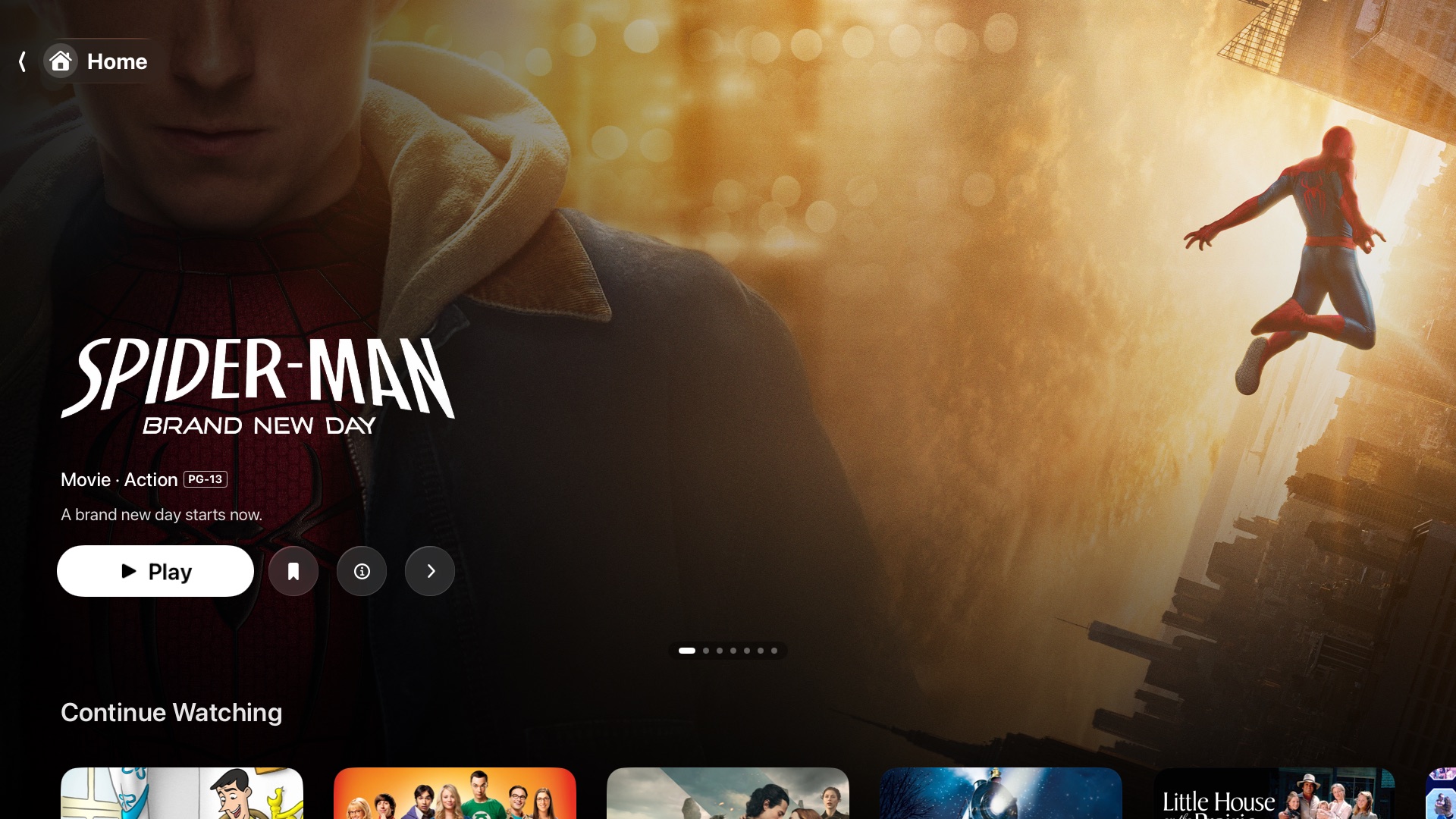
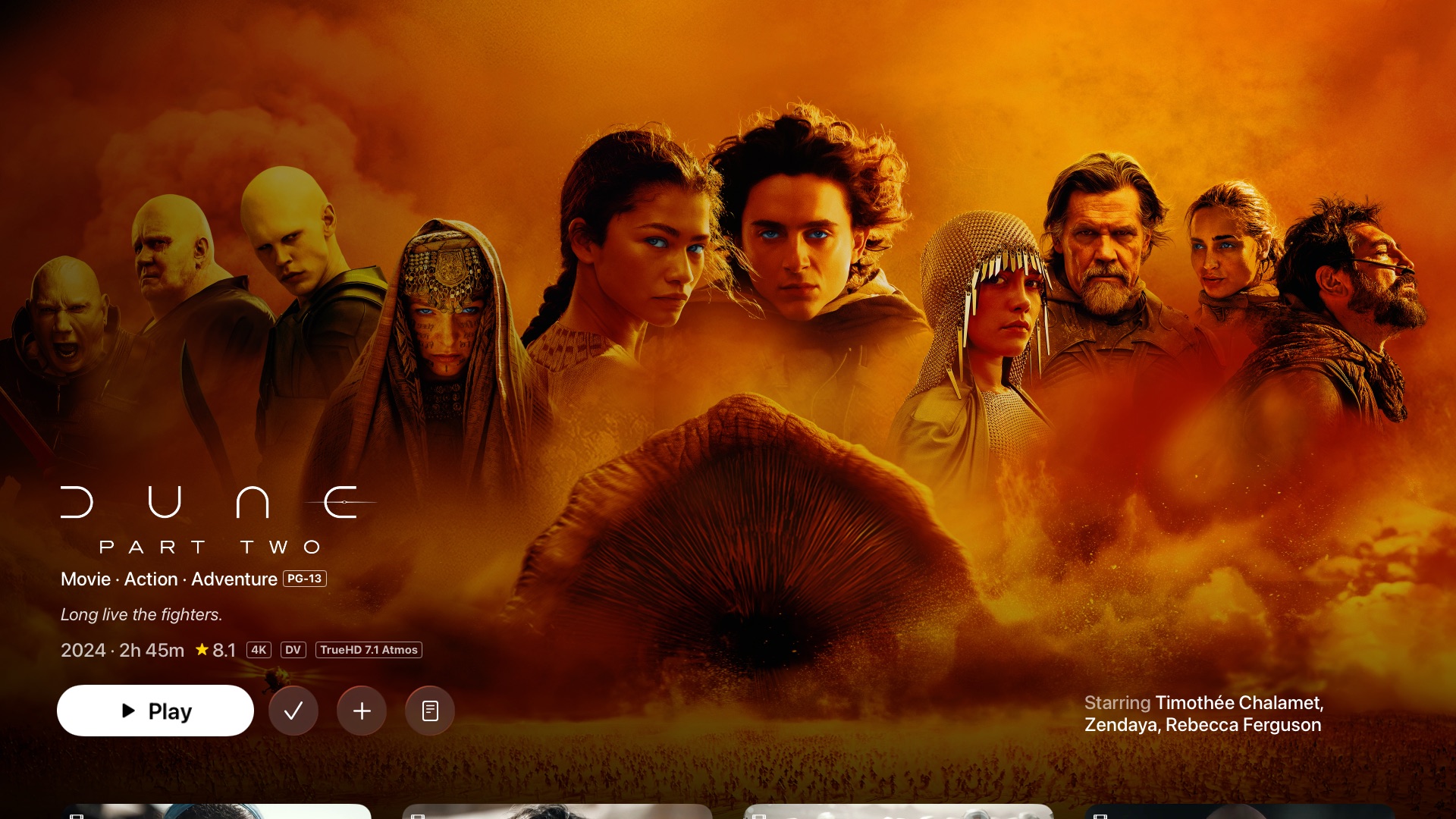
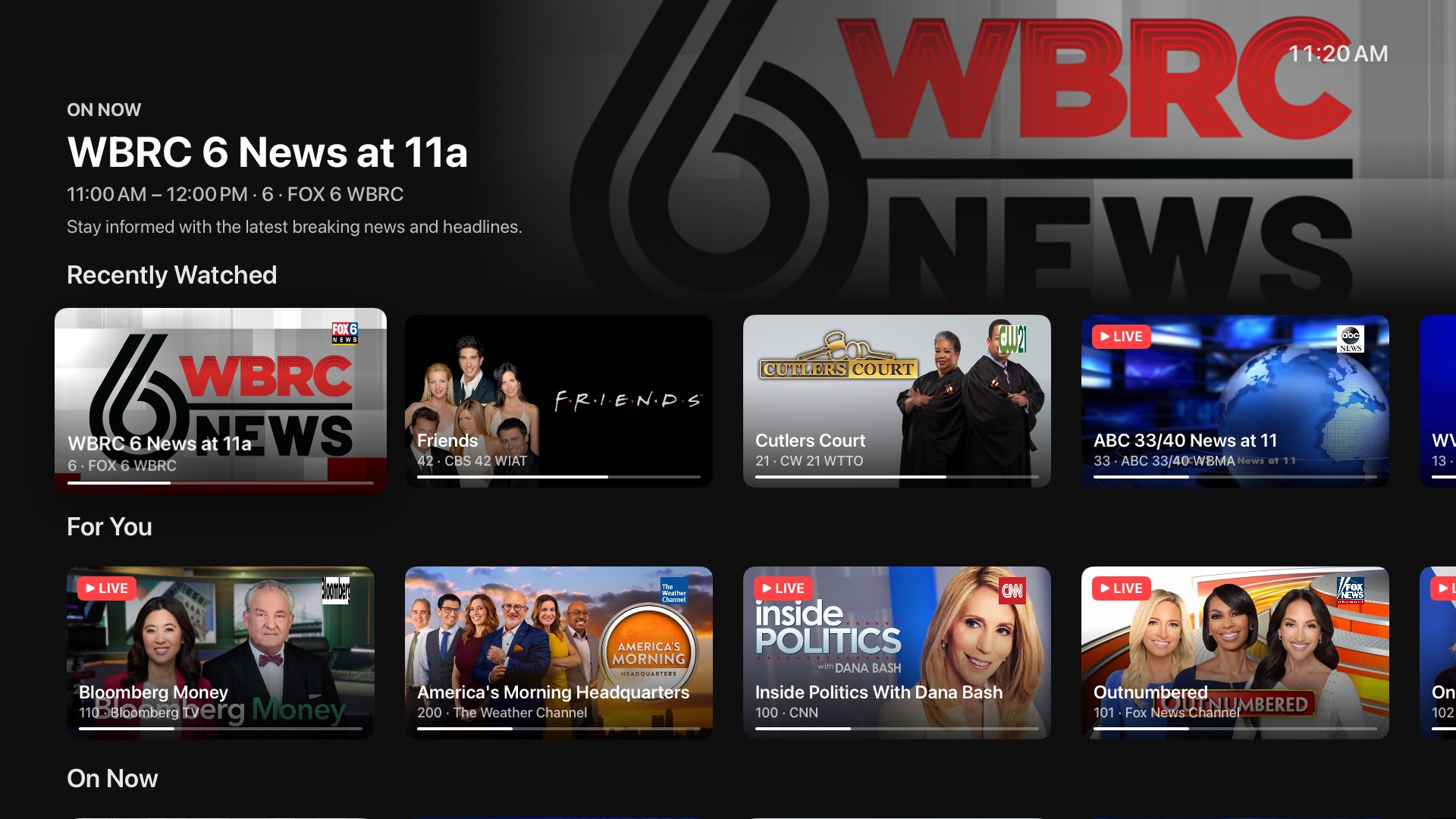
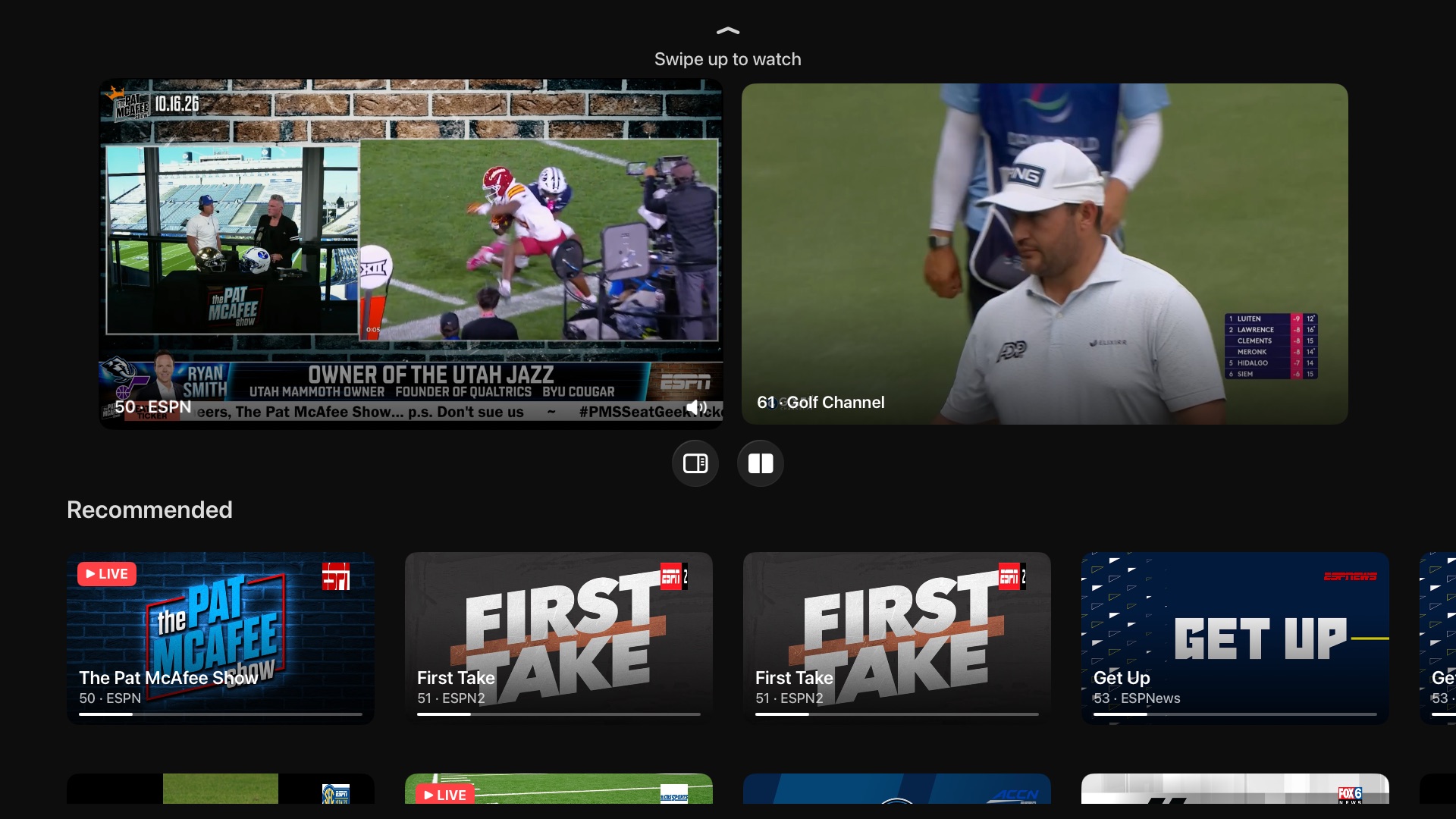
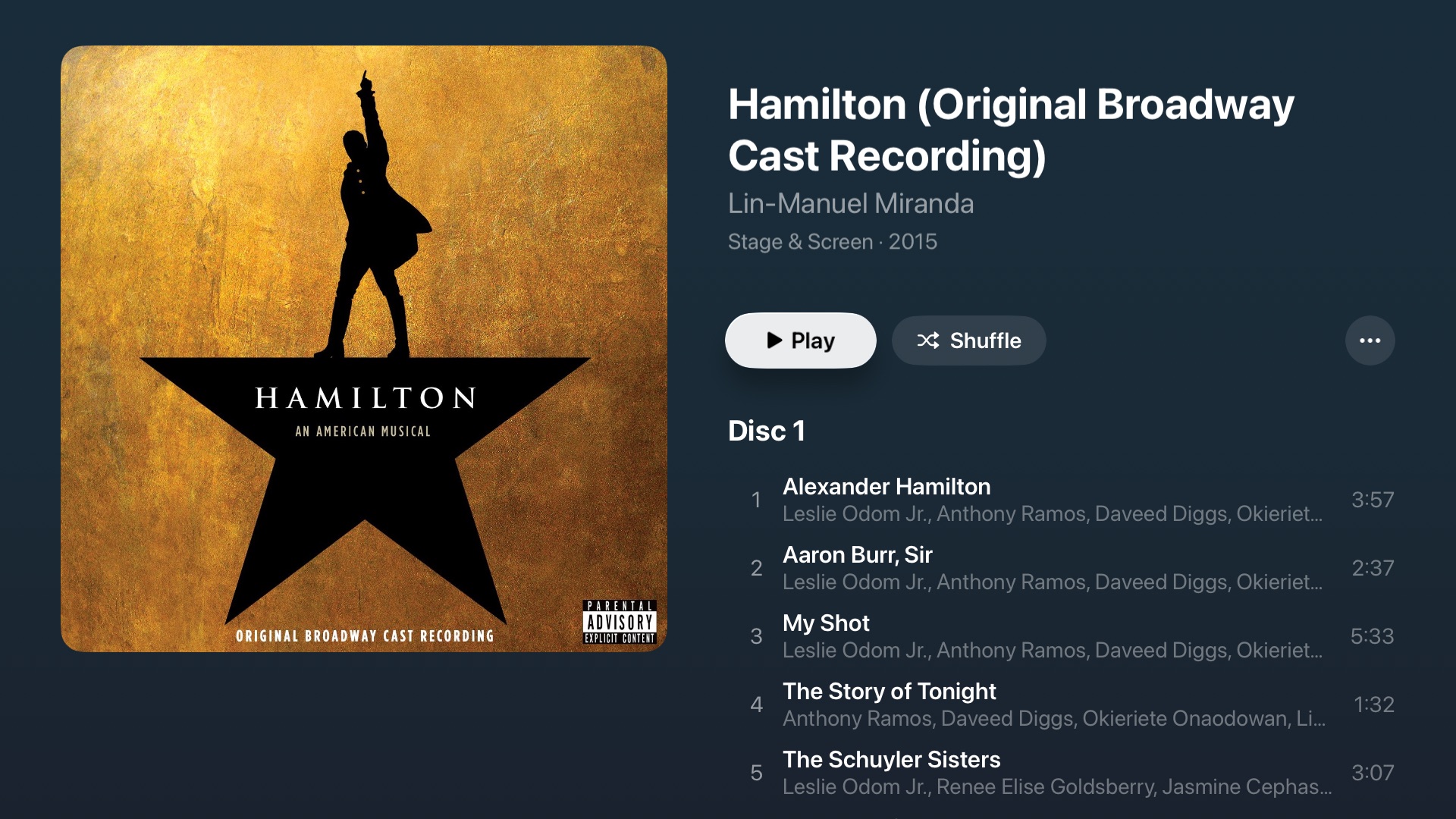
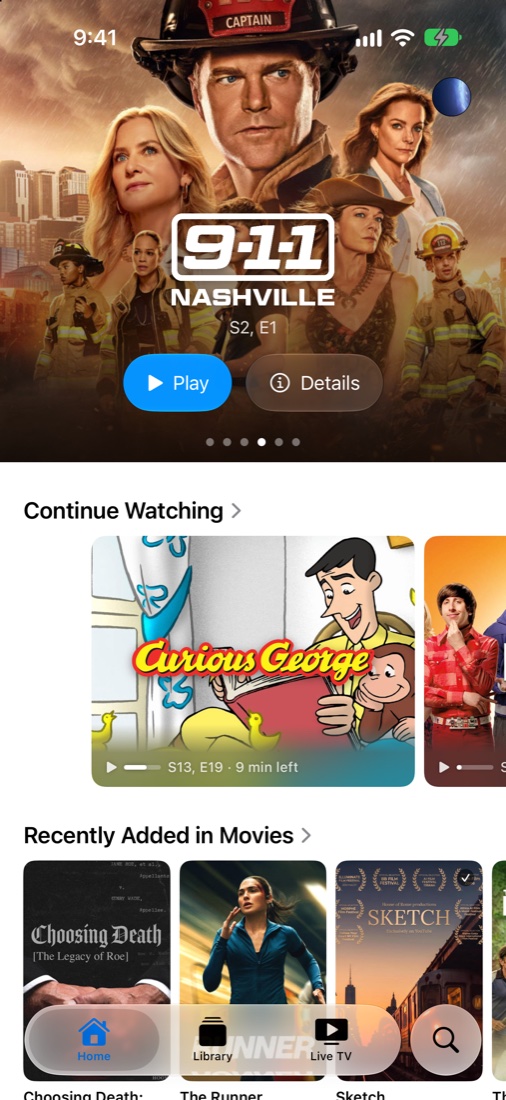
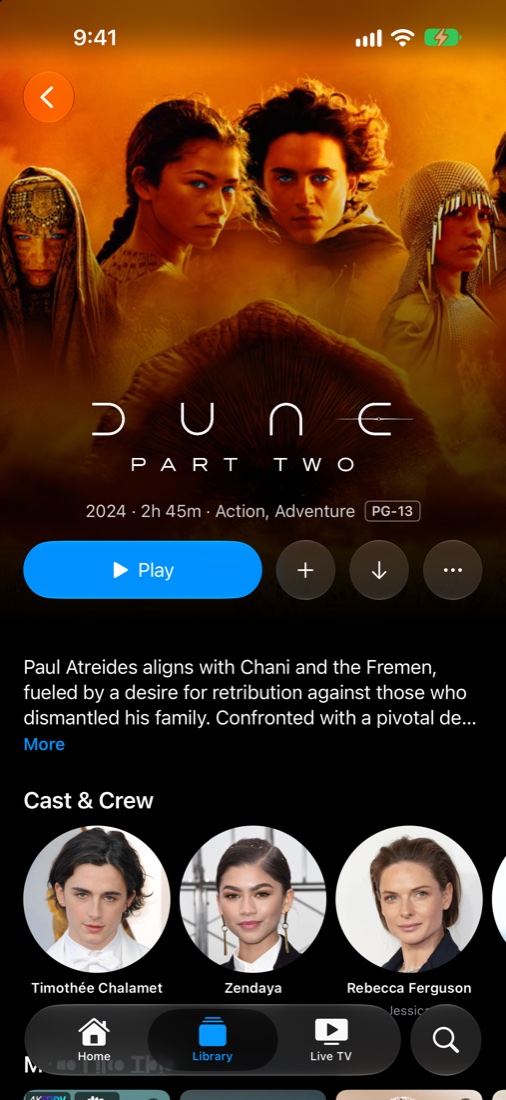
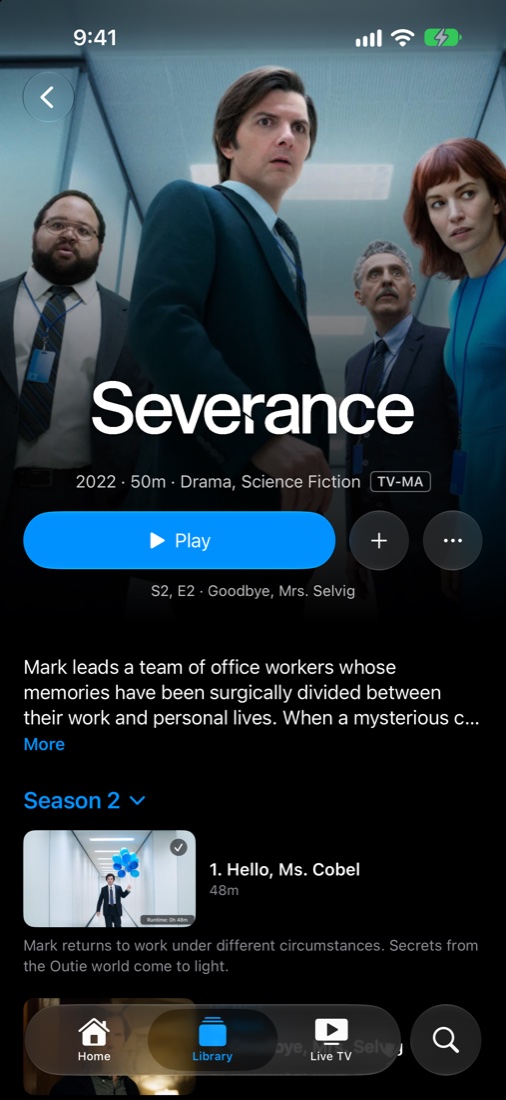
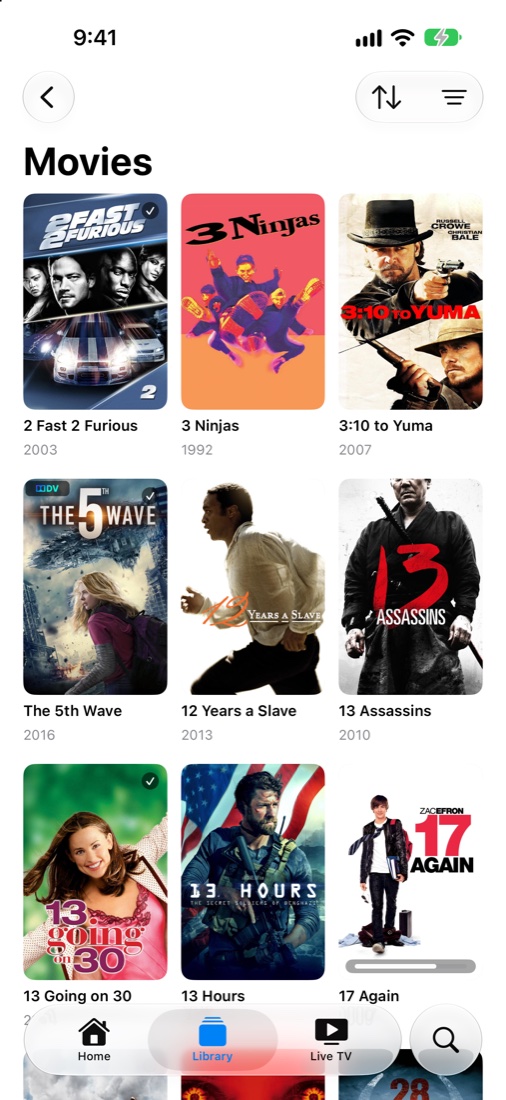
Rivulet is an Apple TV app for Plex, Jellyfin, and live TV. I started it in November 2025. The Plex app never worked well with a HomePod set as my Apple TV's audio output, and I'd spent too long trying to get Plex's live TV to work.
It plays your files as they are, without making the server convert them, so you get the full picture and sound your library has. Audio through a HomePod works the way it should, and so do the Apple TV's own playback controls.
The design borrows heavily from Apple's own TV app. Rivulet is free on the App Store as Rivulet Player, and an iPhone and iPad version is in the TestFlight beta. The source is on GitHub, and you can fork it and build on it as long as you don't sell it.
Features
Plex and Jellyfin
Movies, shows, music, collections, playlists, and Live TV from Plex or Jellyfin. You can add more than one Plex server, and Continue Watching and Top Shelf merge across all of them. Photo libraries and a folder view work too.
Direct play
MKV, MP4, WebM, MPEG-TS, AVI, and more. H.264 and HEVC decode in hardware. AV1, VP9, MPEG-2, VC-1, and almost anything else FFmpeg reads decode in software, and interlaced broadcasts are deinterlaced on the GPU. You can pick a transcode quality when bandwidth is tight.
HDR and Dolby Vision
HDR10, HDR10+, HLG, and Dolby Vision profiles 5, 8.1, and 8.4. On a Dolby Vision TV, Profile 7 FEL plays with both layers composed. Profile 7 MEL plays as 8.1, and without a Dolby Vision TV Profile 7 plays its HDR10 base layer.
Audio and HomePod
AAC, AC3, E-AC3, and FLAC go to tvOS as-is, and Atmos in E-AC3 reaches an Atmos receiver. TrueHD, DTS, and DTS-HD MA are decoded to lossless multichannel audio, with Atmos and DTS:X height channels for your speaker layout. Enhance Dialogue and Reduce Loud Sounds are in the audio menu. Sound works with a HomePod as the Apple TV's output.
Live TV
Dispatcharr, Plex Live TV, Jellyfin Live TV, Xtream Codes, and M3U/XMLTV playlists in one place, and you don't need a media server to use it. Live TV opens on a What's On page with a For You row. You can pause, rewind, and jump back to live on any channel, and sports games have live scores.
Multiview and recording
Watch up to four live channels at once. Record a show, a whole series, or only new episodes through Plex DVR, Jellyfin, or Dispatcharr.
Subtitles
SRT, ASS/SSA with its original styling, WebVTT, PGS, DVB, VobSub, CEA-608 captions, teletext, and external files from your server. Search and download subtitles from the player. When a title has none, Rivulet can write English subtitles from the dialogue on the Apple TV itself.
Content filtering
An optional filter mutes just the offending word, including words you add yourself, and works from the dialogue on titles with no subtitles. It can also skip scenes from an EDL list. Your files are never changed.
Skip markers
Skip Intro and Skip Credits use your server's markers, and each can be off, manual, or automatic. An optional Community Marker Database fills in intro, recap, and credits markers when the server has none.
Discover and Watchlist
Browse trending and upcoming titles from TMDB, add them to your Plex watchlist, and see what you already own. The Watchlist has its own tab in the sidebar.
Insights
While something plays, pull up cast and trivia for what's on screen. It's still a work in progress. There's more on the Insights page.
Music
Browse Plex and Jellyfin albums, artists, and playlists in a layout modeled on Apple's Music app. Lyrics sync when the source has timestamps, and Now Playing has a live audio visualizer.
Top Shelf and Plex Home
Top Shelf on the Apple TV Home screen shows posters for Continue Watching and Recently Added, or full screen artwork if you prefer it. You can switch between Plex Home profiles and save their PINs.
Release history
47 releases since November 2025.
- Patch
- Milestone
October 2026
1.1.0 on the App Store
v1.1.0Latest- Version 1.1.0 went live on the App Store with Jellyfin, multiple Plex servers, and photo libraries
- The App Store listing is now called Rivulet Player
Generated subtitles
v1.1.0 (114)- New generated English subtitles, written from the dialogue on your Apple TV
- A setting turns them on automatically when a title has no subtitles
- Content Filtering has one Profanity page, split into Audio and Visual
- Skip settings read Off, Manual, or Automatic
Word-level filtering
v1.1.0 (113)- Content Filtering mutes just the offending word, including words you add yourself
- Titles with no subtitles can be filtered from their dialogue
- Multi-part movies play through every part
- Top Shelf shows posters for Continue Watching and Recently Added
- Updated AetherEngine to 7.48.0
Jellyfin recording
v1.1.0 (112)- Jellyfin Live TV can record an airing, a series, or new episodes
- Live TV shows the program's artwork and summary while a channel tunes
- Posters with no artwork show the title
Jellyfin extras
v1.1.0 (111)- Jellyfin titles show their trailers and extras on the details page
- Top Shelf shows Recently Added when Continue Watching is empty
New onboarding
v1.1.0 (110)- New onboarding screen and flow
- Each skip button can be turned off completely
- Switch between a Dispatcharr channel's streams from the player
- New Send Diagnostics in About gives you a code to share when reporting a problem
- Updated AetherEngine to 7.47.0
Older releases (52)
October 2026
Multiple servers and playlists
v1.1.0 (106)- Initial support for more than one Plex server
- Top Shelf shows Continue Watching from every server, Jellyfin included
- Plex and Jellyfin video playlists in the sidebar, with shuffle and editing
- New ratings card at the bottom of a title's page
Jellyfin music and Live TV
v1.1.0 (102)- Added Jellyfin music libraries and Jellyfin Live TV
- The Live TV guide loads days ahead and stays up to date
- Fixed Atmos and DTS:X height channels
- Height Speakers opens a list to pick your speaker layout
Folders and Xtream Codes
v1.1.0 (100)- Added folder view and delete in the long press menu
- Added Xtream Codes sources to Live TV, and Live TV only setups open straight to it
- Switch Plex servers in Settings without signing out
- Atmos and DTS:X height channels, and Enhance Dialogue levels
- Updated AetherEngine to 7.44.0
Full Dolby Vision for Profile 7
v1.1.0 (98)- Profile 7 FEL titles play as full Dolby Vision on Dolby Vision TVs
- Updated AetherEngine to 7.39.0
Live scores
v1.1.0 (97)- Live scores for sports games, from a Scores button below the scrubber
- Multiview has its own scores layout during a game
- Search and download subtitles from the menu
- Up Next is a glass card you can dismiss, and autoplay has a limit
Music and photos
v1.1.0 (96)- Lots of improvements to music libraries
- Initial support for photo libraries
- Title logos on Continue Watching, Top Shelf, and Pause are placed with Apple's Vision framework
- Separate Skip Back and Skip Forward settings
Version 1.0.7
v1.0.7 (95)- Cast page improvements
- Subtitles turn on briefly when you skip back
- New Enhance Dialogue and Reduce Loud Sounds audio options
- Updated AetherEngine to 7.32.3
Stream quality
v1.0.6 (93)- Choose a stream quality
- Converted streams start more reliably
Apple's player controls
v1.0.6 (92)- Recreated Apple's player controls
- Added support for Plex titles with more than one file
- Mark a whole show as watched or unwatched
- Updated AetherEngine to 7.25.3
Jellyfin and collections
v1.0.6 (91)- Initial Jellyfin support
- Each Plex library has a Collections row
- Multiview opens from the guide, and the guide has a new design
- Better ASS/SSA subtitles
September 2026
Favorite channels
v1.0.6 (90)- Favorite any Live TV channel by holding Select on it in What's On or the guide
- Favorites from every source share one list, and you can reorder it in Live TV settings
- Channels watched in Multiview count toward Recently Watched and For You
For You and Recently Watched
v1.0.6 (89)- What's On gets a Recently Watched row and a For You row that suggests what's on now
- Dispatcharr channels play smoothly, with sound in sync on HomePod
- Dispatcharr can be added with a username and password instead of an API key
- Plex Live TV waits for slow channels to start instead of giving up
Live TV rebuilt
v1.0.6 (88)- Live TV opens on a new What's On page with rows by genre
- New Multiview plays up to four live channels at once
- Pause, rewind, and return to live on any channel
- Record a show, a series, or only new episodes with Plex DVR or Dispatcharr
Search fix
v1.0.6 (87)- Fixed search results drawing underneath the keyboard
Watchlist tab
v1.0.6 (86)- New Watchlist tab in the sidebar shows everything you saved
- The Watchlist row on Home no longer stops at 20 items
AetherEngine 7.7.0
v1.0.6 (85)- Updated AetherEngine to 7.7.0
- The next episode starts faster when autoplay is on
- Settings shows which playback engine version you're running
- Fixed playback failing outright when the server falls back to transcoding
Version 1.0.6
v1.0.6 (84)- New movies and shows reach the Home screen without a restart
Home network fix
v1.0.5 (83)- Fixed videos failing to play on some home networks
AetherEngine 6.81.0
v1.0.5 (82)- Updated AetherEngine to 6.81.0
- Autoplay no longer flashes black between episodes
A to Z bar
v1.0.5 (81)- Jump to a letter with the new A to Z bar in title-sorted libraries
- Extras and special features resume where you left off
- Holding Up or Down in a library keeps scrolling instead of losing focus
August 2026
Up Next fixes
v1.0.5 (80)- Updated AetherEngine to 6.32.0
- Playback errors say what went wrong instead of showing one generic message
- Autoplay no longer skips an episode when the next one starts
- Back on the Up Next page returns to the video instead of closing the player
Home follows your Plex server
v1.0.5 (79)- Home rows follow the libraries you pinned to Home on your Plex server
- Your sidebar library order sets the order of Home rows
- Captions match the size Apple TV uses in its own player
- New Input Test in Settings records what your remote sends
Season pages
v1.0.5 (78)- A show's page shows each season's poster, episode count, and summary
- Selecting a season opens its own page with only its episodes and extras
- Changing your sidebar libraries applies right away with no reload prompt
Search navigation
v1.0.4 (77)- Search moves down from the keyboard into your results
- Search results scroll into view instead of sitting under the keyboard
- Removed diagnostic logging left in build 76
First iOS build
iOS 1.0.4 (76)- Tagged the first build of the early iPhone and iPad app, which I started on August 5
- The iOS app shares one Plex client with the Apple TV app
Home rows from Plex
v1.0.4 (76)- Fixed Search and Discover ignoring button presses after opening them
- Home shows the rows you promoted on your Plex server, with titles in your language
- Continue Watching and On Deck show as one row
- Updated AetherEngine to 6.5.5
Player control fixes
v1.0.4 (75)- Top Shelf artwork includes the title logo
- Pressing Select opens the player controls without pausing or resuming
- Menu works every time inside popups and full screen pages
Subtitles match Apple TV
v1.0.4 (74)- Updated AetherEngine to 6.4.0
- Subtitles match the text size, background box, and position Apple TV uses for its own captions
- Subtitles keep the bold, italic, underline, color, and size the file asks for
- Pausing registers on your Plex server
July 2026
AetherEngine 6.1.3
v1.0.4 (73)- Updated AetherEngine to 6.1.3
- The progress bar no longer jumps back after a seek on a slow server
- Season rows scroll, so shows with more than eight seasons are reachable
Instant Resume setting
v1.0.4 (72)- Updated AetherEngine to 6.0.2
- New Instant Resume setting decides whether Continue Watching tiles play right away or open the preview
Live TV channel list
v1.0.4 (71)- The Live TV player has a channel list showing what's on now
- The guide refreshes itself, so you no longer arrive at an out of date listing
- Dispatcharr sources respect the channel profile you selected
AetherEngine 5.23.11
v1.0.4 (70)- Updated AetherEngine to 5.23.11 with a long list of playback, seeking, and Live TV fixes
- Dolby Vision Profile 5 titles no longer play with a green or purple tint
- Set how far a single Left or Right press skips, from 5 to 30 seconds
- Skip Credits finishes the title and moves on to Up Next
Version 1.0.4
v1.0.4 (69)- Same changes as build 68, under the 1.0.4 version number
Content filtering
v1.0.3 (68)- New Content Filtering can mute strong language and skip scenes, with per category controls
- Scene skipping reads MCF or EDL filter lists from a URL you provide and never changes your files
- The Live TV guide loads program data as you scroll, so large lineups open faster
- Fixed playback getting stuck after leaving the app and coming back
Live TV guide redesign
v1.0.3 (67)- Redesigned the Live TV guide with a full channel grid, program details, and instant playback
- Updated AetherEngine to 5.8.4, which adds teletext subtitles for broadcast channels
- The player's INFO panel shows whether you're on Direct Play and has an Advanced tab with live stats
- New optional Community Marker Database fills in missing intro, recap, and credits markers
Continue Watching fixes
v1.0.3 (66)- Removing an item from Continue Watching is instant and keeps your watch progress
- New Go to Show option opens the show page at your current episode
- Watch from Beginning starts playback from the beginning
Full changelog in Settings
v1.0.3 (65)- Updated AetherEngine to 5.0.5 with subtitle and skipping fixes
- The changelog in Settings shows the full release history
Subtitle track picker
v1.0.3 (64)- Continue Watching stays up to date after you finish something and come back
- You can pick any subtitle track, including more than one per language
Remembered track choices
v1.0.3 (63)- Rivulet remembers your audio and subtitle choices, forced subtitles included
- Fixed duplicate subtitle lines stacking up after rewinding
- You can swipe through the Home carousel
AetherEngine 5.0
v1.0.3 (62)- Updated AetherEngine to 5.0
- Builds are also published on GitHub Releases
Version 1.0.3
v1.0.3 (61)- Pressing Back in the sidebar returns you to Home
- The preview carousel shows series info
- Insights works on TV episodes
Insights and new player controls
v1.0.2 (59)- New Insights panel shows cast and trivia for what you're watching, as a work in progress
- Redesigned player controls with a glass control bar and scrubbing thumbnail previews
- Top Shelf shows Continue Watching with full bleed artwork and the title logo
- New Home hero highlights trending movies and shows
June 2026
First tagged build
v1.0.1 (56)- Playback resumes correctly after leaving and returning to the app
- Watchlist items you own show proper artwork and a Play button
- Refreshed app icon
Released on the App Store
App Store- Rivulet for Plex went live on the App Store as a free Apple TV app
- Tagged releases started building automatically and going to TestFlight
UIKit rewrite and App Store prep
Build 50- Rebuilt most views in UIKit for better performance
- Added AetherEngine as a third video player option
- Added a licenses screen, TMDB attribution, and a privacy manifest for App Store review
May 2026
AetherEngine and a new license
AetherEngine- Added AetherEngine as a Swift package behind the existing player interface
- Switched the license from GPL-3.0 to PolyForm Noncommercial 1.0.0
April 2026
Discover and Watchlist
Build 47- New Discover page with Popular, Top Rated, Now Playing, and Upcoming titles from TMDB
- Plex Watchlist items appear on Home and can be added or removed from anywhere
Custom video player
Build 44- Built a custom video player on FFmpeg and Apple's tvOS frameworks
- Restyled much of the interface after Apple's TV app
- Apple's built-in player stayed available as a setting
January 2026
Plex Home and Dolby Vision
Build 36- Added Plex Home account support
- Tried an experimental Dolby Vision player
- Library sections appear individually on Home
- Added a changelog popup in Settings
December 2025
Public TestFlight link
TestFlight- Added the public TestFlight link to the README
- Added Top Shelf items on the Apple TV Home screen
First working prototype
Prototype- Built the first working prototype
- Started IPTV support the same day
- Created the GitHub repository
November 2025
Project started
Started- Created the Xcode project
Roadmap
- Done
Live TV rebuild
What's On, Multiview, pause and rewind, DVR recording, and shared favorites went to the TestFlight beta in 1.0.6 builds 88 to 90.
- Done
Jellyfin
Movies, shows, music, trailers, and extras, and Live TV with recording. Jellyfin shipped to the App Store in 1.1.0.
- Now
Multiple Plex servers
Initial support shipped in 1.1.0. I don't use more than one server day to day, so bug reports on GitHub help.
- Now
iPhone and iPad app
The iOS and iPadOS app shares Rivulet's core code and follows the Apple TV app's features. It's in the TestFlight beta as 1.0.7.
- Now
Insights coverage
Insights is a work in progress, and I'm still improving its coverage and accuracy.
- Later
Music closer to Plexamp
Music browsing works today. On features I'm chasing Plexamp, and there's a long way to go.
FAQ
What do I need to run Rivulet?
An Apple TV on tvOS 26 or later. Movies and shows come from a Plex Media Server or a Jellyfin server. For live TV you need Plex Live TV, Jellyfin Live TV, Dispatcharr, an Xtream Codes source, or an M3U playlist with XMLTV guide data. A Live TV source on its own is enough.
Is it free?
Yes. Rivulet is free on the App Store, and the TestFlight beta is free too. The source code is under PolyForm Noncommercial 1.0.0, so you can clone it, change it, and share it for noncommercial use. Selling it or putting it inside a paid product is not allowed.
What's the difference between the App Store and TestFlight versions?
Every tagged build goes to the TestFlight beta, and the App Store version updates less often. As of October 26, 2026 the App Store has 1.1.0 and the beta is on 1.1.0 (114). The iPhone and iPad app is only on TestFlight for now.
Does Rivulet transcode?
Only when you ask it to or when it has to. Rivulet direct plays through AetherEngine. It asks the server to transcode when you pick a lower stream quality or a file can't direct play.
Which Dolby Vision profiles work?
Profiles 5, 8.1, and 8.4 play as full Dolby Vision. On a Dolby Vision TV, Profile 7 FEL plays with both layers composed, and Profile 7 MEL plays as 8.1. Without a Dolby Vision TV, Profile 7 plays its HDR10 base layer.
Which live TV sources work best?
I test Dispatcharr and Plex Live TV regularly. Generic M3U/XMLTV sources work but have had less testing, so feedback helps.
Does Rivulet collect data?
Rivulet doesn't collect personal data. It uses Sentry for crash reports and TMDB for artwork and metadata. The privacy policy has the details.
Is Rivulet made by Plex?
No. Rivulet isn't affiliated with or endorsed by Plex, Inc. or the Jellyfin project.
Where do I report a bug or ask for a feature?
Open an issue on GitHub. Pull requests are welcome from developers at any level, including LLM-assisted code as long as it's been checked and tested. Please test on a real Apple TV, since the simulator doesn't behave the same.
Rivulet
A native Apple TV app for Plex, Jellyfin, and live TV